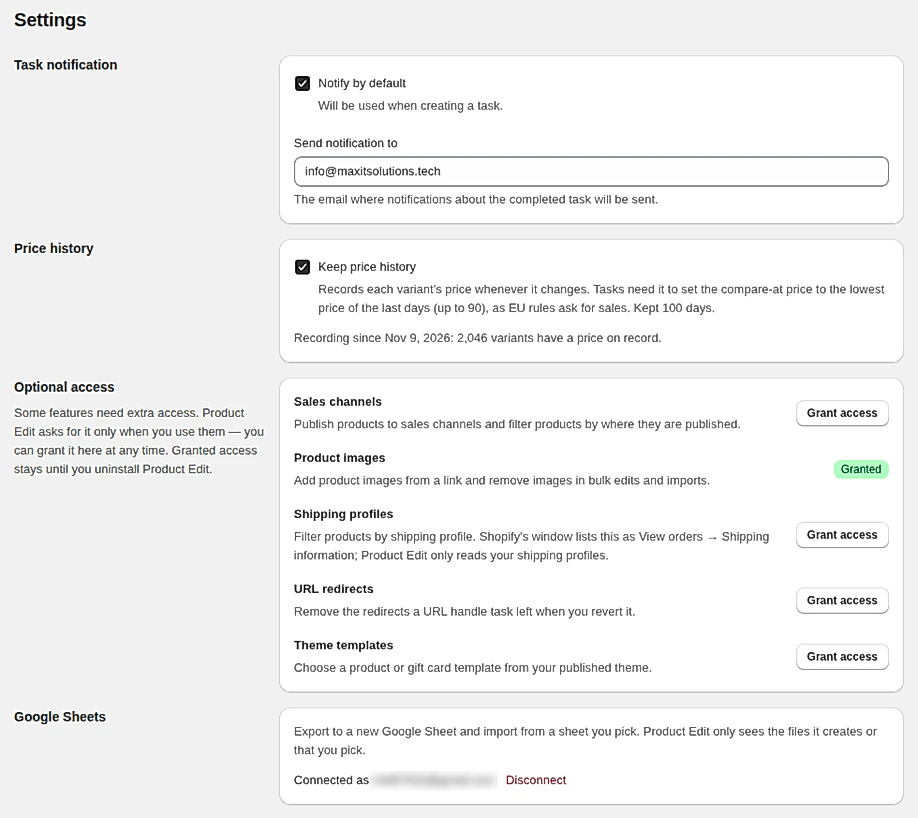
Open Settings in Bulk Product Edit to choose who gets an email when a task finishes, connect Google Sheets, start the price history that EU sale prices need, and grant the extra Shopify access a few features ask for.
What each setting does
| Option | What it does | Plan |
|---|---|---|
| Notify by default | Turns on the email for every new task. The help text reads “Will be used when creating a task.” | — |
| Send notification to | The address that gets the email when a task finishes | — |
| Connect Google Sheets | Lets exports create a new Google Sheet and imports read a sheet you pick | Growth |
| Keep price history | Records each variant’s price whenever it changes, kept for 100 days | Pro |
| Optional access | One row per extra Shopify permission, each marked Granted or offering Grant access | — |
Email when a task finishes
Notify by default only sets the starting value. Each task still has its own Notify by email choice under When to run, so you can switch it off for a small edit or on for a big overnight run. On the task page, With notification in Summary reads Yes for tasks that send one. Tasks started from Shopify Flow show With notification like any other task.
How to connect Google Sheets
- Click Connect Google Sheets (Growth and up). Google asks which account to use and what the app may access.
- Keep the Google Drive box ticked. Without it the app can’t create or read sheets, and the export fails with “Google Drive access wasn’t allowed, so Product Edit can’t create or read sheets. Connect Google Sheets again in Settings and keep the Google Drive box ticked.” Settings then shows Connect Google Sheets again.
- Back in Settings, the section reads Connected as and your Google address, with Disconnect next to it.
The app sees only the files it creates and the sheets you pick. Exporting to a sheet is on Export products to Excel or CSV.
Turn on price history before an EU sale
The compare-at option Set to the lowest price of the last N days works only from prices the app recorded itself. Until Keep price history is on (Pro), that option shows “Turn on price history in Settings first: Product Edit can only use prices it recorded.” with an Open Settings link.
Recording starts the day you switch it on, so turn it on at least as many days before the sale as the task will look back: 30 is the usual EU period, and the app goes up to 90. History is kept for 100 days. How to run the sale itself is on EU sales: the lowest price of the last 30 days.
Optional access and what each row opens
The app asks for these permissions only when you use a feature that needs them. You can grant one here ahead of time, or from the orange banner that appears inside a filter or an import column that needs it.
| Access | What it opens |
|---|---|
| Sales channels | Publishing products to sales channels and filtering by where they are published (Publish products on sales channels) |
| Product images | Adding images from a link and removing images in bulk edits and imports |
| Shipping profiles | The Shipping profile filter; the app only reads your profiles |
| URL redirects | Removing the redirects a URL handle task left when you revert it |
| Theme templates | Choosing a product or gift card template from your published theme (Change the product template in bulk) |
To grant one, click Grant access on its row. Shopify opens its Update data access window; click Update and the row changes to Granted. Shopify lists shipping profiles there as “View orders” and “Shipping information”, though the app reads only the profiles. If you click Cancel or close the window, Shopify shows “Update canceled”, the row says “Access was not granted.”, and the feature stays locked until you try again.
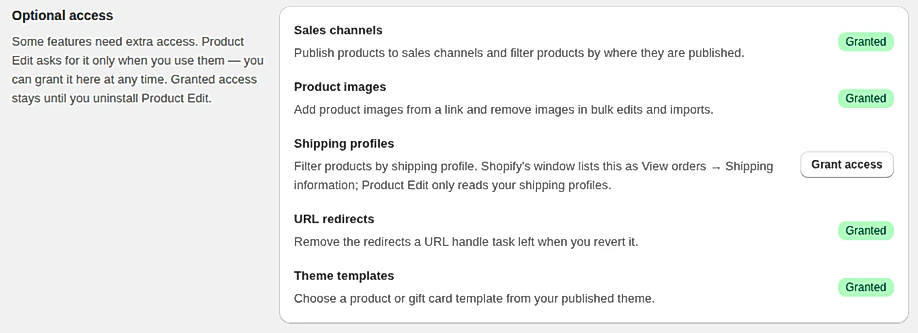
Note: Granted access stays until you uninstall Product Edit. The app has no button to take it back.
Related
- EU sales: the lowest price of the last 30 days
- Export products to Excel or CSV
- Publish products on sales channels
- Change the product template in bulk
Updated