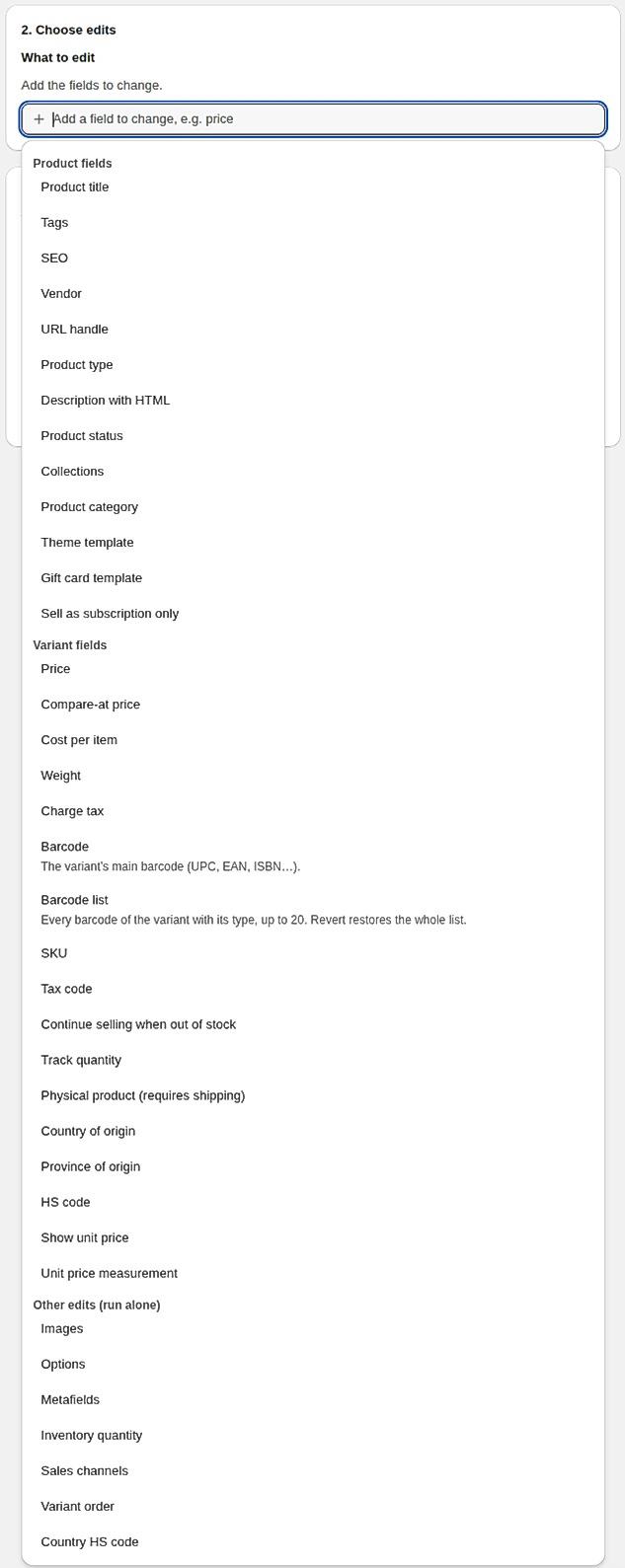
On New task, type a field into What to edit and pick it from Product fields, Variant fields or Other edits (run alone). Each edit card opens at Choose how to change, which lists that edit’s options. The tables below list every edit, its options, the plan it needs and the guide page that uses it on a real job.
How edits share a task
- One task can hold several product field edits. The task log has one row per field per product.
- Product and variant edits run as separate tasks. While a product edit is on the form, the picker greys out Variant fields with “Product and variant edits run as separate tasks.”
- An edit from Other edits (run alone) is the only edit in its task.
- Collection and metaobject edits appear once you choose Collections or Metaobjects as the records a task edits. Which records a task edits and how filters pick them is covered in How a task is built and All filters and conditions.
- Every edit is on every plan, Free included, except the ones marked Growth or Pro below. A locked option shows the plan that opens it.
Text actions
Text fields share one set of actions: Change to, Replace text, Add text to the beginning, Add text to the end, Remove text, Change case, Trim extra spaces, Fill from a template, Limit the length, Cut from a word to the end and Copy from field. The tables call this set “text actions” and name the fields where it differs.
Fill from a template replaces each field with values from the item itself. The chips include {{title}}, {{vendor}}, {{product_type}}, {{handle}} and {{current}}, and SKU and barcode edits add {{sku}}, {{barcode}}, {{option1}} to {{option3}} and {{variant_title}}. {{n}} numbers the records from the First number you set, and {{n:3}} pads it to 001. Add text puts in no space for you, so type it yourself (-sale with a hyphen on a URL handle).
Ready-made edits
Ready-made edits open from Home › Start a task, by search or the Popular edits chips. The What to edit picker on New task does not list them. Each one fills in the edit cards it needs (price, compare-at, tracking and shipping settings) with their options locked.
| Ready-made edit | What it sets | Plan | Shown on |
|---|---|---|---|
| Sell products at a discount (by percentage) / (by amount) | Price goes down; the old price becomes the compare-at price | All plans | Run a sale that ends on its own |
| Sell products at a discount at the same price (by percentage) / (by amount) | Price stays; the compare-at price is set above it | All plans | Run a sale that ends on its own |
| End a sale | Price goes back to the compare-at price and the compare-at price is cleared; a price is never lowered | All plans | End a sale and restore prices |
| Raise prices and compare-at prices | Both go up by the percentage you enter, so discounts stay | All plans | Raise prices by a percentage |
| Keep selling when out of stock | Tracks quantity and keeps taking orders after stock runs out | All plans | Keep selling when out of stock |
| Make products digital | No shipping required and quantity not tracked | All plans | Fix weights and shipping settings |
Note: Sell products at a discount overwrites a compare-at price the variant already had. The “at the same price” edits invent a compare-at price, and the app warns: “Use a compare-at price you really charged; in the EU it must be your lowest price of the last 30 days.”
Product fields
| Edit | Options | Plan | Shown on |
|---|---|---|---|
| Product title | Text actions | All plans | Remove or replace text in titles and descriptions |
| Description with HTML | Change to, Replace text/HTML, Add text/HTML to the beginning, Add text/HTML to the end, Remove text/HTML | All plans | Remove or replace text in titles and descriptions |
| Vendor, Product type | Text actions | All plans | Remove or replace text in titles and descriptions |
| SEO (adds SEO title and SEO description) | Text actions plus Clear (use the product title / description) | All plans | SEO titles, descriptions and URL handles |
| URL handle | Change to, Replace text, Add text to the beginning, Add text to the end, Remove text, Copy from field, Reset to a handle made from the title; checkbox Leave a redirect from the old URL (on by default) | All plans | SEO titles, descriptions and URL handles |
| Tags | Add new tags, Remove tags, Replace all tags, Rename a tag, Clear all tags, Remove tags containing text | All plans | Clean up product tags |
| Product status | Change to Active, Draft, Archived or Unlisted | All plans | Launch, draft or archive products |
| Collections | Add to collections, Remove from collections (manual collections only) | All plans | Add products to collections in bulk |
| Product category | Change to, Remove category | All plans | Set the product category in bulk |
| Theme template, Gift card template | Change to a template of the published theme, Use the default template | All plans | Change the product template in bulk |
| Sell as subscription only | Change to Sell as subscription only, or turn it off | All plans | Publish products on sales channels |
Variant fields
Price, compare-at and cost edits share the money actions Change to, Adjust (by amount), Adjust (by percentage), Round to an ending (such as .99) and Round to a multiple (such as 0.05 or 5). An adjustment has its own Rounding setting and a Check the calculation example line with an old and a new value.
| Edit | Options | Plan | Shown on |
|---|---|---|---|
| Price | Money actions, Adjust based on compare-at price (by amount or percentage), Set from cost plus markup (by amount or percentage), Swap with the compare-at price | All plans | Raise prices by a percentage, Price from cost and fix low margins |
| Compare-at price | Money actions, Set the same as the price, Adjust based on price (by amount or percentage), Set from cost plus markup (by amount or percentage), Set from a percent off the price, Clear | All plans | Run a sale that ends on its own |
| Compare-at price: Set to the lowest price of the last N days | The lowest price each variant had in the N days before the task runs (a rolling window, not calendar days); needs Settings › Keep price history. Put the sale price edit and this edit in the same task: a price cut in an earlier task is already the lowest price, so the variant is skipped | Pro | EU sales: the lowest price of the last 30 days |
| Cost per item | Money actions, Adjust based on price and Adjust based on compare-at price (by amount or percentage), Clear | All plans | Price from cost and fix low margins |
| Weight | Change to, Adjust (by amount or percentage), Convert to another unit | All plans | Fix weights and shipping settings |
| Physical product (requires shipping) | Change to Physical product (requires shipping) or No shipping required | All plans | Fix weights and shipping settings |
| SKU | Text actions, with SKU template chips | All plans | Fill missing SKUs |
| Barcode | Text actions | All plans | Fix missing and duplicated barcodes |
| Barcode list | Add barcodes, Remove barcodes, Replace all barcodes, Clear all barcodes (up to 20 per variant) | All plans | Fix missing and duplicated barcodes |
| Charge tax | Change to Charge tax or Don’t charge tax | All plans | Turn tax on or off for many products |
| Tax code | Change to, Replace text, Add text to the beginning, Add text to the end, Remove text | All plans | Turn tax on or off for many products |
| Continue selling when out of stock | Change to continue or deny selling | All plans | Keep selling when out of stock |
| Track quantity | Change to Track quantity or Don’t track quantity | All plans | Keep selling when out of stock |
| Country of origin | Change to a country, Clear country of origin | All plans | Add HS codes and country of origin |
| Province of origin | Change to a country, then a province, Clear province of origin | All plans | Add HS codes and country of origin |
| HS code | Change to, Remove HS code (6 to 13 digits) | All plans | Add HS codes and country of origin |
| Show unit price | Change to Show unit price or Hide | All plans | Show unit prices on many products |
| Unit price measurement | Quantity and unit sold, price per a reference unit (500 G sold, price per 1 KG) | All plans | Show unit prices on many products |
Note: Barcode with Change to writes the same barcode on every selected variant. For a unique code per variant, use Fill from a template with
{{n}}.
Other edits (run alone)
| Edit | Options | Plan | Shown on |
|---|---|---|---|
| Images | Add images (one URL per line, up to 20), Image alt text (template with {{title}} and the image number {{n}}, only images without alt text), Remove images (all, or the image at a position), Reorder images (such as reverse the order, images before videos and 3D models, variant images first), Variant image (the product image at a position) |
All plans | Variant images and image order, Fill missing image alt text |
| Options | Rename option, Rename option value, Move an option (to a new position), Sort option values (A to Z, Z to A, by the first number, by clothing size) | All plans | Rename options and option values, Sort sizes, colors and variants |
| Options: Add an option value | Up to 20 new values; new variants copy price, compare-at price, cost, weight, tax and inventory settings from a source value; optional SKU and barcode templates and starting stock | Growth | Add a new size to many products |
| Metafields | Product metafields or Variant metafields, a store definition or Metafield without definition; operations depend on the type (set, clear, copy, add or replace text, adjust numbers) | All plans | Fill product and variant metafields |
| Inventory quantity | Change to, Adjust (by amount), Adjust (by percentage), Move to another location, Copy to another location; quantity state (Available, On hand, Damaged, Quality control, Reserved, Safety stock), Reason, Locations | All plans | Set stock levels in bulk, Move stock to another location |
| Sales channels | Publish on sales channels, Unpublish from sales channels | All plans | Publish products on sales channels |
| Variant order | Sort variants by option order, by price (lowest or highest first), by SKU, by inventory | All plans | Sort sizes, colors and variants |
| Country HS code | A country and the HS code for that country; other countries keep theirs | All plans | Add HS codes and country of origin |
Collection and metaobject edits
| Edit | Options | Plan | Shown on |
|---|---|---|---|
| Collection title | Text actions except Copy from field | All plans | Edit collection titles and descriptions |
| Collection description | Change to, Replace text/HTML, Add text/HTML to the beginning, Add text/HTML to the end, Remove text/HTML | All plans | Edit collection titles and descriptions |
| Metaobject field (each field of the definition) | By field type: text, number (Change to, Adjust (by amount), Adjust (by percentage), Clear (delete)), money, true or false, choice, reference, copy, clear | Growth | Edit metaobject entries in bulk |
| Metaobject handle | Set a new handle, replace text, copy from the display name | Growth | Edit metaobject entries in bulk |
| Metaobject status | Active or Draft (publishable definitions only) | Growth | Edit metaobject entries in bulk |
Fields the app cannot write yet sit under Can’t be changed in bulk in the picker, with the reason.
What revert restores
A revert writes back the value each changed item had before the task (Revert a bulk edit that went wrong). It does not check for later edits: a value changed by hand in Shopify after the task is overwritten, and the task still ends as Reverted with no warning. These edits behave differently:
- Tags: each product gets back the tag list it had before the task. Tags changed in Shopify in the meantime are lost.
- URL handle: revert also removes the redirect the task left, unless it was changed in Shopify since. Links to the new handle that were shared while the task was live stop working.
- Barcode list: the whole list comes back, barcode types included.
- Inventory quantity: a task that adjusted or moved stock is reverted by the same amount in the other direction, so sales and restocks made in between are kept. A task that set stock to a number (Change to) or changed On hand gets the old number back, which overwrites later stock changes.
- Add an option value: revert deletes the variants the task created, with their stock.
- Unit price measurement and Country HS code: Shopify cannot remove these once set, so a revert can only bring back a previous value. On a product that had none, the revert ends as Revert failed (Task statuses and messages).
- Metaobject handle: the old handle comes back; no redirect is created at any point.
Why items are skipped
Some edits pass over items they cannot apply to and list each one with a reason on the task’s Skipped tab:
- Sell as subscription only: products without a subscription plan.
- Gift card template: every product that is not a gift card.
- Province of origin: a province that does not belong to the variant’s country of origin.
- Options edits: products without the named option. Renaming a value to one the option already has fails with “Option value already exists.”
- Reorder images: products with more than 250 media. Variant image: products with fewer images than the position.
- Metafields: products outside the categories a definition applies to.
- End a sale: variants with no compare-at price.
- Set to the lowest price of the last N days: variants whose lowest price is not above the price (“The lowest price of the last %d days (%s) is not above the price (%s).”), whose price history is shorter than N days (“Price history starts on %s; %d days are needed.”) or that have no record at the start of the window (“There is no price history for this variant from %s.”). The compare-at price stays unchanged.
Limits
- Bulk Product Edit has no edit that deletes products or variants.
- Theme template lists only templates in the published theme; add one in Online Store › Themes › Customize first. Theme templates, sales channels, adding and removing images (Product images) and redirect removal on revert each need an optional access you grant in Settings.
- Inventory quantity counts stock rows per task: 15 on Free, 3,000 on Starter, 15,000 on Growth and 150,000 on Pro.
- Set to the lowest price of the last N days reads price history from the day Keep price history is turned on, up to 90 days.
Related
- All filters and conditions
- Task statuses and messages
- Change the product template in bulk
- Bulk edit Shopify products
Updated