Inventory is the field most likely to be wrong and the most expensive to get wrong: understated stock loses sales, overstated stock produces cancellations.
The app edits inventory the way Shopify expects — per location, with a reason attached — instead of overwriting numbers and leaving the history blank.
Inventory operations
- Set quantity at a chosen location.
- Adjust quantity by amount — add or subtract from what is already there.
- Reason codes — correction, cycle count available, damaged, quality control, received, restock, shrinkage, promotion, movement and reservation events.
- Track quantity — switch inventory tracking on or off in bulk.
- Inventory policy — continue selling when out of stock, or deny it.
Correct stock at one location, with a reason code, in a single task.
You will be redirected to the Shopify app store.
Finding the variants to correct
- By location — work one warehouse or store at a time.
- By total quantity — more than, less than, or equal to a threshold.
- By out of stock somewhere — the variants that are zero in at least one location.
- By track quantity — find the variants that are not tracked at all.
- By collection, vendor or product type to scope a correction to one part of the catalog.
- By SKU or barcode when you are reconciling against a supplier file.
A worked example: a stocktake correction at one location
- Filter: product type is “Boots”, location is “Main warehouse”.
- Editor: inventory quantity → adjust by amount, decrease by 2, reason “cycle count available”.
- Preview the selection and exclude anything already counted.
- Run it, then open the log — every variant shows its old and new quantity.
Stopping the overselling problem
Two settings decide whether a variant can sell into negative stock: whether quantity is tracked at all, and the inventory policy. Both are bulk-editable, so “stop selling everything that is out of stock” is one filtered task rather than a per-variant chore.
Inventory edits count towards the per-task item limit by variant, so a 5,000-variant correction needs the Standard plan or higher.
How to bulk edit inventory on Shopify, step by step
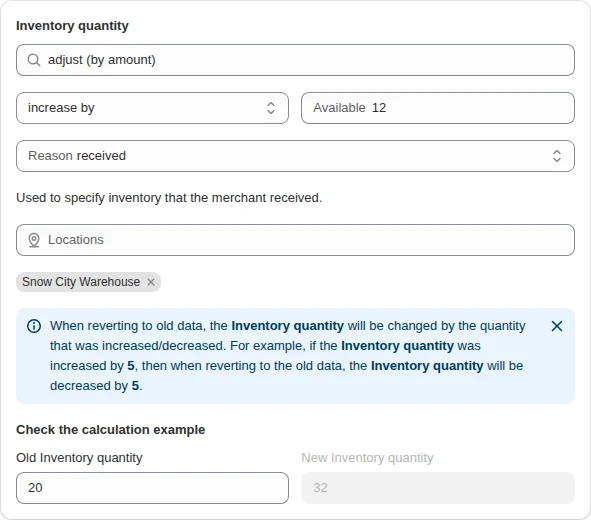
- Start from the template. On the app’s home page, type “inventory” under Start a bulk edit and pick Inventory quantity — the task opens with the inventory editor ready.
- Filter the variants. Variant filters work best for stock: SKU, barcode, option value, current quantity, or “out of stock somewhere”.
- Choose the location. Each inventory item is counted per location — five variants in two locations are ten inventory items. If a location is missing from the list, use “Load/update all locations”.
- Pick the action. Set the quantity, or adjust it up or down by an amount.
- Choose a reason. Shopify’s reasons are available: correction, cycle count, received, damaged, shrinkage, restock, safety stock, quality control and others. They show in Shopify’s inventory history.
- Run and read the log. Old and new quantities per variant and location.
Inventory fields you can change
| Field | Options | Typical use |
|---|---|---|
| Quantity | set, adjust by amount, per location | Stock count, goods received |
| Inventory policy | continue / deny selling when out of stock | Allow pre-orders for a range |
| Cost per item | set, adjust, clear | Keep margins accurate after a delivery |
Multi-location stock
Stores with a warehouse and a shop, or several 3PLs, usually change one location at a time. Filter the variants, pick the location, and the other locations are left alone. Use the quantity filters — available, committed, incoming, reserved — to find the variants that need attention before you edit them.
Keeping inventory trustworthy
- Filter on “out of stock somewhere” weekly to catch variants sold out in one location and plentiful in another.
- Switch policy to “deny” before a clearance sale so you do not oversell discounted items.
- Record a reason on every adjustment; the Shopify inventory history becomes an audit trail.
- Revert works on quantity too: the revert moves the quantity back by the amount the task changed it, so sales made in between are not overwritten.
Set or adjust? Choose by what you know
| You know | Action | Reason | Example |
|---|---|---|---|
| The exact count from a stocktake | change to | cycle count available | Shelf count says 14 → set 14 |
| How many units arrived | adjust (by amount) + | received | +12 from the supplier delivery |
| How many units were written off | adjust (by amount) − | damaged or shrinkage | −3 broken in transit |
| Returned units are sellable again | adjust (by amount) + | restock | +2 from returns |
| Units given away | adjust (by amount) − | promotion | −5 for an influencer campaign |
Adjusting is safer while orders keep coming in: it adds or removes units relative to the live number, so a sale made between your count and the task is not overwritten. Set an absolute number only when the count was taken just before the task runs.
Reason codes, in plain words
| Reason | Use it for |
|---|---|
| correction | Fixing an inventory error, or a general adjustment |
| cycle count available | A recount that differs from the recorded quantity |
| received | Stock that arrived |
| restock | A returned unit going back to sellable stock |
| damaged | Removing units because of damage |
| shrinkage | Stock lower than recorded because of theft or loss |
| promotion | Units removed for a promotion or donation |
| quality control | Units held for inspection |
| safety stock | Units set aside to guard against overselling |
| movement / reservation reasons | Transfers, purchase orders and reserved units |
| other | Anything that fits none of the above |
A worked example: receive a supplier delivery
- Filter: vendor is the supplier, product type matches the delivery.
- Location: the warehouse that received the goods.
- Editor: inventory quantity → adjust (by amount) +12, reason received.
- Preview and exclude every variant that was not in the delivery.
- Run, then check the log: each variant shows the old and new quantity at that location.
For deliveries with different quantities per variant, split the task: one filter per quantity, or one task per product type. It takes minutes and keeps every line in the inventory history labelled.
How inventory counts toward plan limits
Inventory has its own limit: a maximum number of inventory items per task. An inventory item is counted per location, so changing a variant in three locations at once counts as three. Large multi-location corrections are cheaper in item terms when you run one location per task.
Tracking and selling policy, in bulk
| Products | Track quantity | When out of stock | Why |
|---|---|---|---|
| Regular stock | track quantity | deny selling | No orders for units you do not have |
| Pre-orders and made-to-order | track quantity | continue selling | Orders keep coming; stock goes negative and shows demand |
| Clearance items | track quantity | deny selling | Discounted units must not oversell |
| Digital goods, services, gift wrap | don’t track quantity | — | There is no stock to count |
Switching a range from pre-order back to normal stock is one task: filter the product type or tag, set policy to deny selling, run. Do it before the delivery is booked in, not after the first oversold order.
A weekly routine for multi-location stores
- Monday: filter “out of stock somewhere” and list variants that are zero in one location and stocked in another — candidates for a transfer.
- After each delivery: adjust by amount with reason received, one location per task.
- After returns are checked: adjust with reason restock for sellable units, damaged for the rest.
- End of month: recount the fast sellers and set the counted quantity with reason cycle count available.
Every step leaves a reason in Shopify’s inventory history, so a quantity that looks wrong in three months can be traced to the task that set it.
Related guides
Bulk edit SKU and barcode on Shopify
Correct SKU and barcode values across variants with replace, prefix and suffix rules.
Read more