Tagging starts tidy and ends up as three spellings of the same word, a season that finished two years ago, and a tag that only exists on the forty products someone edited manually.
Because so much automation reads tags, cleaning them up is not cosmetic — it decides which products appear in which collection and which workflows fire.
Tag operations
- Add new tags — one or several, to every matched product.
- Remove tags — retire a tag across the catalog in one pass.
- Add and remove in the same task — the usual way to rename a tag.
- Reverting a tag task is limited: tags the task added are not removed, so undo an “add tags” task with a matching “remove tags” task.
Retire an old tag and roll out its replacement in a single task.
You will be redirected to the Shopify app store.
Selecting products to retag
- By existing tag — contains or does not contain, which is how you find the mis-spelled variants.
- By collection — tag everything in a manual collection so a smart collection can take over.
- By vendor or product type.
- By inventory — tag what is out of stock so the storefront can treat it differently.
- By creation date — tag this season’s arrivals as “new”.
A worked example: rename a tag across the catalog
- Filter: tag contains “sale2024”.
- Editor: tags → add “clearance”.
- Editor: tags → remove “sale2024”.
- Preview the matched products, then run it.
- Automated collections built on “clearance” pick the products up as soon as Shopify reindexes them.
Watch the spaces
Shopify treats tags as literal strings: “Winter Boots” and “winter boots” are two tags, and a stray space creates a third. When you add tags in bulk, type them exactly as your collections and workflows expect.
Because a tag task is hard to undo, the safe habit is to run it on a small filtered set first, look at the result on the storefront, then widen the filter.
How to bulk edit tags on Shopify, step by step
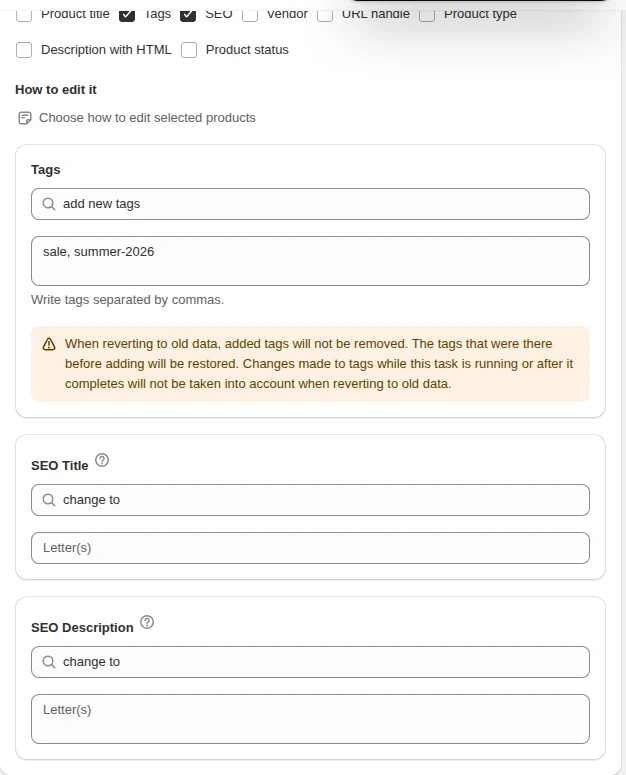
- Select the products. Filter by collection, vendor, type, title text, price or an existing tag.
- Choose Tags. Pick “add new tags” or “remove tags”.
- Write the tags. Separate several tags with commas. Tags are added only if missing, and removed only where present.
- Preview and run. The log shows the tag list before and after for each product.
Tag recipes merchants use every week
| Goal | Filter | Action |
|---|---|---|
| Build a sale collection | collection Summer, inventory > 0 | add tag sale |
| Protect full-price items | vendor Premium | add tag no-discount |
| Clean up old campaigns | tag contains bf-2025 | remove tag bf-2025 |
| Feed a smart collection | product type Hoodie | add tag winter |
| Mark slow sellers | created before 2025-06-01, inventory > 20 | add tag markdown |
Tags and automated collections
Automated collections built on tag conditions update as soon as tags change. Adding a tag in bulk is therefore the fastest way to fill a seasonal collection, and removing it empties the collection again without editing the collection itself.
How reverting works for tags
Tags are the one field where a revert is deliberately limited, and the task screen says so next to the editor: reverting an “add new tags” task restores the tags products had before, but does not take the added tags off, and tag changes made during or after the task are not taken into account. The reliable way to undo a tag task is the opposite task — remove the same tags you added.
Undoing a tag task
| Task you ran | What revert does | Reliable undo |
|---|---|---|
| Add new tags | Restores the earlier tag list but does not take the added tags off | Run remove tags with the same tags |
| Remove tags | Removed tags are not added back | Add a marker tag before removing, then filter on the marker to re-add |
Tag edits made by other apps or by hand while the task runs or after it finishes are not taken into account by the revert. For tags, treat the opposite task as the undo button.
A worked example: end-of-season cleanup
- Filter: product tag contains
summer-2026. - Editor: tags → add
archived-summer-2026. This marker is how you find the products again later. - Editor: tags → remove
summer-2026in the same task. - Preview, exclude the evergreen products that should stay in the summer collection, then run.
- Open the summer collection on the storefront: it should be empty or hold only the products you excluded.
Tag naming that still works a year later
- Prefix by purpose —
sale-,season-,feed-,internal-. A prefix makes “tag contains” filters precise. - Put the year in campaign tags —
bf-2026, notblackfriday, so next year’s campaign does not inherit last year’s products. - One spelling — lowercase with hyphens. Separate several tags with commas in the editor.
- Keep a list of tags other systems read — before removing a tag, check it is not a condition in an automated collection or a Flow workflow.
What reads your tags
| System | Uses tags for | What a careless bulk edit does |
|---|---|---|
| Automated collections | Collection membership | Products drop out of a collection, or the wrong ones join |
| Discounts on collections | Which products the discount applies to | A sale covers more or fewer products than planned |
| Storefront filters (Search & Discovery) | Filter values shoppers click | Filters show dead or duplicate values |
| Shopify Flow | Conditions in workflows | Workflows fire on the wrong products, or stop firing |
| Feed and marketing apps | Labels and exclusions | Products leave or enter ad campaigns |
Audit tags before you clean them up
Tag drift is easiest to see with filters rather than by scrolling the product list. Three passes find most of it:
- Spelling variants. Filter on “product tag contains” a short stem such as
saleand preview:Sale,sale,on-saleandsalewith a trailing space all show up together. - Missing tags. Filter a collection or product type with “does not contain” the tag that should be there — the preview is the list of gaps.
- Dead campaigns. Filter on last year’s campaign prefix, for example
bf-2025, and check whether any collection or discount still uses it before removing.
| Found | Fix in one task |
|---|---|
Sale and sale on different products | filter tag contains Sale → add sale, remove Sale |
| New arrivals never tagged | filter created after a date, tag does not contain new → add new |
| A finished campaign tag | filter tag contains bf-2025 → remove bf-2025 |
Tag, product type or vendor?
Tags are flexible, which is why they get overloaded. Put information in the field built for it, and keep tags for grouping that changes:
| Information | Best field | Why |
|---|---|---|
| What the product is (Hoodie, Boot) | Product type | One value per product, used in filters and feeds |
| Who makes it | Vendor | One value, filterable, used by supplier repricing |
| Season, campaign, collection rules | Tags | Many values that come and go |
| Internal flags (no-discount, needs-photos) | Tags with a prefix | Easy to add and remove in bulk |
Product type and vendor are bulk-editable too, so moving information out of tags is a filtered task, not a manual project.
Related guides
Bulk edit products by collection on Shopify
Use collection membership as the filter, combined with stock, tags and price.
Read moreHow to trigger edits from Shopify Flow
Trigger rule-based bulk edits from Flow workflows, with the log and revert intact.
Read moreA quarterly catalog hygiene checklist
Nine filters that show exactly where your catalog data has drifted.
Read more