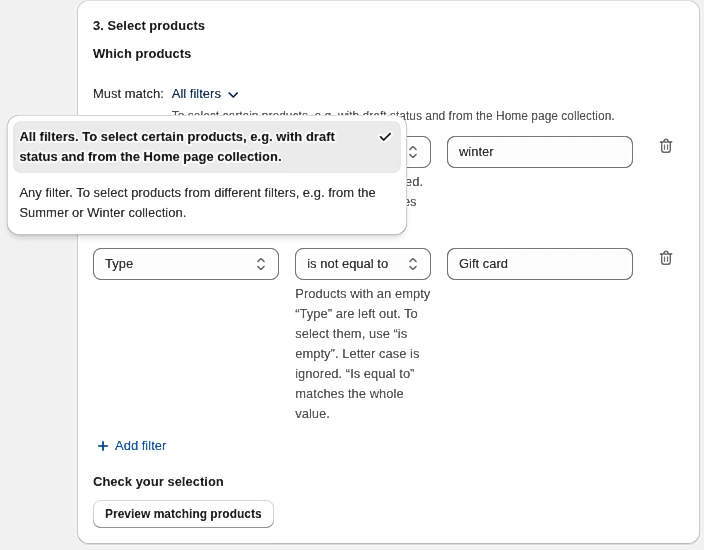
Filters decide which products a task changes. Open New task, pick the records, then under 3. Select products click Add filter and set a field, a condition and a value for each row. Choose Must match: All filters or Any filter, then click Preview matching products to see the exact list before you save.
How filters combine
Every filter row has three parts: the field, the condition and the value. Must match sets how the rows work together:
| Must match | What it selects | Example |
|---|---|---|
| All filters | products that match every row | Draft products from the Home page collection |
| Any filter | products that match at least one row | Products from the Summer or the Winter collection |
A task needs at least one filter. Saving without one shows “Filters: add at least one filter.” To edit the whole catalog, add the filter All products. It removes every other row.
Only first variant from each product works with All filters only, so the Must match link greys out. The preview still lists every variant of each product, but the task changes only the first one.
Product filters or variant filters
A product filter looks at products. When it checks a variant field (price, SKU, weight, stock), a product matches when any of its variants matches, and the task then edits all of that product’s variants. A product with one variant priced 45 and two priced 20 matches Price more than 40.
Is empty works the other way on product filters: every variant must be empty. Compare-at price is empty finds only products where no variant has a compare-at price.
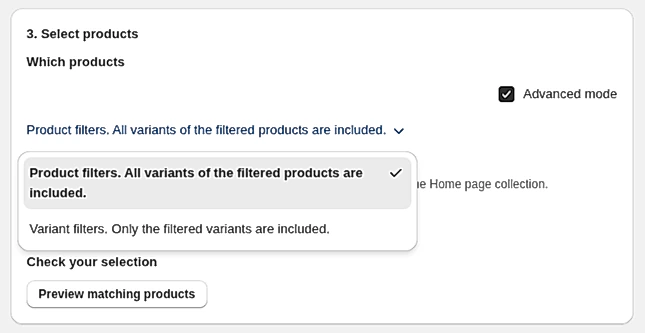
To pick single variants, tick Advanced mode and choose one of the two options:
- “Product filters. All variants of the filtered products are included.”
- “Variant filters. Only the filtered variants are included.”
Switching between them clears the filter rows. With variant filters the section heading turns 3. Select variants, the button reads Preview matching variants and the list names each variant with its product. You cannot exclude single variants from that preview; the app says “Only the filters choose variants. To leave some variants out, narrow the filters.” Excluding by hand works on products only, as shown in How a task is built.
Conditions
Each field offers one set of conditions. The tables below name the set.
| Set | Conditions |
|---|---|
| Text | is equal to · is not equal to · contains · does not contain · starts with · does not start with · ends with · does not end with |
| Text and lists | the Text conditions plus is any of · is none of (one value per line, up to 100 values) |
| Tags | the Text conditions plus has any of · has all of · has none of · is empty |
| Numbers | is equal to · more than · less than · at least · at most · between (From / To) |
| Dates | before · after (date and time in your browser’s time zone, shown as “Time zone: …” under the boxes; 12:00 AM by default) · within the last N days · older than N days |
| Codes | is equal to · is not equal to · is empty · is not empty |
| Yes / no | yes · no |
| Metafield | the Text conditions plus more than · less than · is empty |
Text conditions ignore letter case, and the hint under the row says so: “Letter case is ignored. “Is equal to” matches the whole value.” A number row left blank turns red on preview: “Cannot be empty. Fill it in or remove this filter.”
Empty values and “is not equal to”
On Type, SEO title, Theme template and Category, the conditions “is not equal to” and “does not contain” leave out products whose field is empty. Type is not equal to Gift card skips products with no type at all. To keep them, add a second row “Type is empty” and switch to Any filter.
These keep empty values: Tag has none of, Collection is not equal to, SKU and Barcode is not equal to, and Country of origin is not equal to.
Product filters
On the Products & variants records, without Advanced mode.
| Filter | Conditions | Shown on a real job |
|---|---|---|
| Selected products | are: Shopify’s product picker, up to 250 | Add products to collections in bulk |
| Collection | is equal to · is not equal to | Add products to collections in bulk |
| Category | is equal to · is not equal to · is empty | Set the product category in bulk |
| Title | Text and lists | Remove or replace text in titles and descriptions |
| Tag | Tags | Clean up product tags |
| Handle | Text and lists | Remove or replace text in titles and descriptions |
| Description | Text · is empty | Remove or replace text in titles and descriptions |
| SEO title | Text · is empty · is not empty | SEO titles, descriptions and URL handles |
| SEO description | Text · is empty · is not empty | SEO titles, descriptions and URL handles |
| Theme template | Codes; the template suffix, sale for product.sale |
Change the product template in bulk |
| Type | Text and lists · is empty | Remove or replace text in titles and descriptions |
| Vendor | Text and lists | Remove or replace text in titles and descriptions |
| Status | is equal to · is not equal to: Active, Draft, Archived, Unlisted | Launch, draft or archive products |
| Sell as subscription only | Yes / no | Publish products on sales channels |
| On sale | Yes / no | Run a sale that ends on its own |
| Number of variants | Numbers | Add a new size to many products |
| In no collection | Yes / no | Add products to collections in bulk |
| Online Store | is equal to · is not equal to: Published, not published | Hide sold-out products |
| Sales channel | is equal to · is not equal to (asks for Sales channels access) | Publish products on sales channels |
| Shipping profile | is equal to · is not equal to (asks for Shipping profiles access) | Fix weights and shipping settings |
| Number of images | Numbers; 0 finds products without images | Variant images and image order |
| Image without alt text | Yes / no | Fill missing image alt text |
| Option value | Text · is empty, with an option name and a value | Add a new size to many products |
| Duplicate title | Yes / no | Find and fix duplicate SKUs |
| Metafield | Metafield; a store definition or “Metafield without definition” | Fill product and variant metafields |
| Created time | Dates | Tag new arrivals automatically |
| Published time | Dates · is empty (not on the Online Store) | Tag new arrivals automatically |
| Updated time | Dates | How a task is built |
| Is gift card | Yes / no | Change the product template in bulk |
| Price | Numbers | Raise prices by a percentage |
| Compare-at price | Numbers · is empty | End a sale and restore prices |
| Margin % | Numbers · is empty | Price from cost and fix low margins |
| Discount % | Numbers · is empty | Run a sale that ends on its own |
| Compare-at price not above the price | Yes / no | End a sale and restore prices |
| SKU | Text and lists · is empty · is not empty | Fill missing SKUs |
| Barcode | Text and lists · is empty · is not empty | Fix missing and duplicated barcodes |
| Duplicate SKU | Yes / no | Find and fix duplicate SKUs |
| Duplicate barcode | Yes / no | Fix missing and duplicated barcodes |
| Taxable | Yes / no | Turn tax on or off for many products |
| Physical product (requires shipping) | Yes / no | Fix weights and shipping settings |
| Country of origin | Codes · is any of · is none of | Add HS codes and country of origin |
| HS code | Text · is empty · is not empty | Add HS codes and country of origin |
| Only default variant | Yes / no | How a task is built |
| Only first variant from each product | no condition | How a task is built |
| Cost per item | Numbers · is empty | Price from cost and fix low margins |
| Weight | Numbers · is empty, with a unit g, kg, lb or oz | Fix weights and shipping settings |
| Continue selling when out of stock | Yes / no | Keep selling when out of stock |
| Total quantity | Numbers | Set stock levels in bulk |
| Track quantity | Yes / no | Keep selling when out of stock |
| Out of stock somewhere | Yes / no | Hide sold-out products |
| All products | no condition | How a task is built |
Weight converts units, so 0.5 lb also finds a variant stored as 500 g.
Variant filters
Advanced mode › “Variant filters. Only the filtered variants are included.” Each row checks one variant at a time, so Compare-at price is empty finds every single variant without a compare-at price.
| Filter | Conditions | Shown on a real job |
|---|---|---|
| Selected variants | are: Shopify’s variant picker, up to 250 | How a task is built |
| Collection | is equal to · is not equal to | Add products to collections in bulk |
| Category | is equal to · is not equal to · is empty | Set the product category in bulk |
| Type | Text and lists · is empty | Remove or replace text in titles and descriptions |
| Status (product) | is equal to · is not equal to | Launch, draft or archive products |
| Tag | Tags | Clean up product tags |
| Vendor | Text and lists | Remove or replace text in titles and descriptions |
| Is gift card | Yes / no | Change the product template in bulk |
| Variant’s title | Text and lists | Rename options and option values |
| Price | Numbers | Raise prices by a percentage |
| Compare-at price | Numbers · is empty | Run a sale that ends on its own |
| Margin % | Numbers · is empty | Price from cost and fix low margins |
| Discount % | Numbers · is empty | EU sales: the lowest price of the last 30 days |
| Compare-at price not above the price | Yes / no | End a sale and restore prices |
| Unit price | Numbers · is empty | Show unit prices on many products |
| Barcode | Text and lists · is empty · is not empty | Fix missing and duplicated barcodes |
| SKU | Text and lists · is empty · is not empty | Fill missing SKUs |
| Duplicate SKU | Yes / no | Find and fix duplicate SKUs |
| Duplicate barcode | Yes / no | Fix missing and duplicated barcodes |
| Taxable | Yes / no | Turn tax on or off for many products |
| Physical product (requires shipping) | Yes / no | Fix weights and shipping settings |
| Country of origin | Codes · is any of · is none of | Add HS codes and country of origin |
| HS code | Text · is empty · is not empty | Add HS codes and country of origin |
| Tax code | Text · is empty · is not empty | Turn tax on or off for many products |
| Has an image | Yes / no | Variant images and image order |
| Available for sale | Yes / no (Shopify’s own flag) | Hide sold-out products |
| Variant’s created time | Dates | How a task is built |
| Variant’s updated time | Dates | How a task is built |
| Option1: value, Option2: value, Option3: value | Text and lists · is empty | Fill missing SKUs |
| Variant metafield | Metafield; namespace, key and value | Fill product and variant metafields |
| Cost per item | Numbers · is empty | Price from cost and fix low margins |
| Weight | Numbers · is empty, with a unit | Fix weights and shipping settings |
| Quantity | Numbers | Set stock levels in bulk |
| Available at a location | Numbers, with a location | Move stock to another location |
| Quantity at a location | Numbers, with a location and a state | Set stock levels in bulk |
| Continue selling when out of stock | Yes / no | Keep selling when out of stock |
Available for sale follows Shopify, which also counts draft and archived products that have stock or keep selling when out of stock. Quantity at a location reads one state: Incoming, On hand, Available, Committed, Reserved, Damaged, Safety stock or Quality control.
Collection filters
On the Collections records the section reads 3. Select collections and has no Advanced mode. A new row starts as Title is equal to. Examples are on Edit collection titles and descriptions.
| Filter | Conditions |
|---|---|
| Selected collections | are: Shopify’s collection picker, up to 250 |
| Title | is equal to · is not equal to |
| Handle | is equal to · is not equal to |
| Collection type | is equal to · is not equal to: Smart, Manual |
| Online Store | is equal to · is not equal to: Published, not published |
| Updated time | before · after |
Metaobject entry filters
On the Metaobjects records you pick one definition per task (Growth and up). A new row starts as Display name is equal to. Examples are on Edit metaobject entries in bulk.
| Filter | Conditions |
|---|---|
| Display name | is equal to · is not equal to |
| Handle | is equal to · is not equal to |
| Updated time | before · after |
| Status (publishable definitions only) | is equal to · is not equal to: Active, Draft |
| Fields of the definition that Shopify lets you filter | is equal to · is not equal to · more than / less than (numbers and dates) · is empty · is not empty |
| All N entries (N is the entry count) | no condition; greys out the row and Add filter |
Filters that take longer on a large catalog
Duplicate SKU, Duplicate barcode and Duplicate title scan the whole catalog first. The app shows “Finding duplicates in your catalog… This can take a few minutes.” Shopify cannot search by Country of origin, by duplicates or by “contains”, so the app checks those page by page. On a catalog of thousands of products, add a Tag, Collection or Vendor row first and switch Must match to All filters, so the slow row checks fewer products.
Related
- How a task is built: records, edits, filters and scheduling on one form.
- All edits and their options: what a task can change once the filters pick the products.
- Find and fix duplicate SKUs: the duplicate filters on a real catalog.
- Price from cost and fix low margins: Margin % and Cost per item filters at work.
Updated