Shopify’s own bulk editor is a spreadsheet: it shows you the price field and expects you to type the new number into every row. That works for ten products. For a thousand, you need rules rather than typing — “take 15% off everything in this collection and round to .99” — and you need a way back if the rule was wrong.
Bulk Product Edit by MITS applies price rules to a filtered slice of the catalog, shows the calculation on a sample before it writes anything, and stores the previous price of every variant it touches.
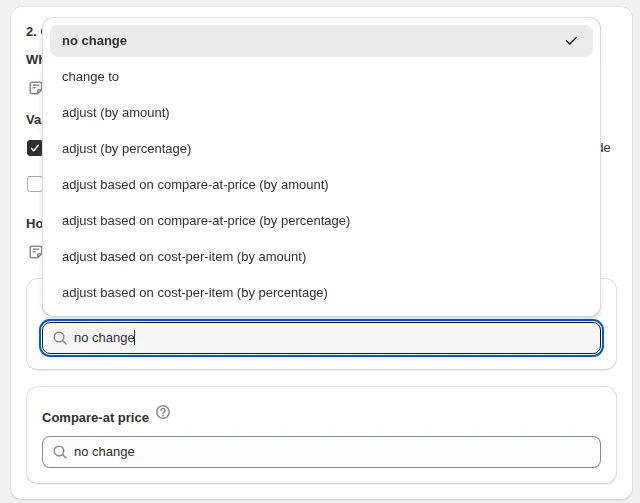
Ways to change a price
- Change to — set the same price on every matched variant.
- Increase or decrease by amount — move every price by a fixed sum in your store currency.
- Increase or decrease by percentage — the usual way to run a sale or absorb a supplier increase.
- Adjust based on cost per item — price from cost by amount or percentage, which is margin pricing without a spreadsheet.
- Adjust based on compare-at price — derive the live price from the reference price you already keep.
- Round to — apply a rounding rule after the calculation so the catalog ends in the decimals your store uses instead of 17.4285.
Run a price change on five products for free and read the result before you trust it with the catalog.
You will be redirected to the Shopify app store.
Choosing which products get the new price
- By collection — the most common way to run a category sale.
- By vendor or product type — for supplier-wide or category-wide changes.
- By tag — if you already tag seasonal or clearance products.
- By current price — more than, less than, equal to; useful for price-band rules.
- By inventory — discount only what is actually in stock.
- By creation date — mark down products that have been sitting for a season.
- Filters combine with match all or match any, and you can preview the selection and exclude individual products before running.
A worked example: 20% off one collection for a weekend
- Filter: collection is “Summer”, inventory quantity more than 0.
- Editor: compare-at price → set the same as the price, so the original price shows as the reference.
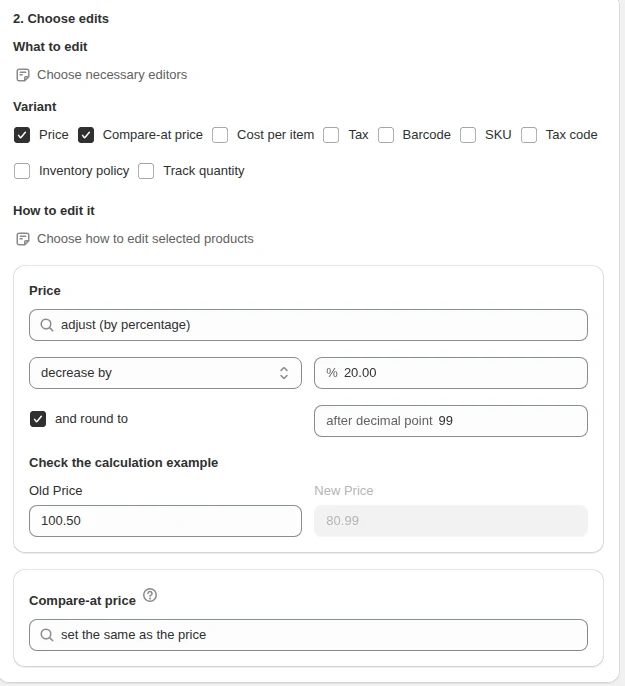
- Editor: price → decrease by 20%, round to .99.
- Scheduler: start Friday 00:00, revert Monday 00:00.
- Run it. The task changes the prices on Friday and puts every one of them back on Monday, without anyone logging in over the weekend.
If the rule was wrong
Every task keeps the old value of each field it wrote. Open the task, hit revert, and prices go back to what they were — or set the revert time up front and let the app do it on schedule.
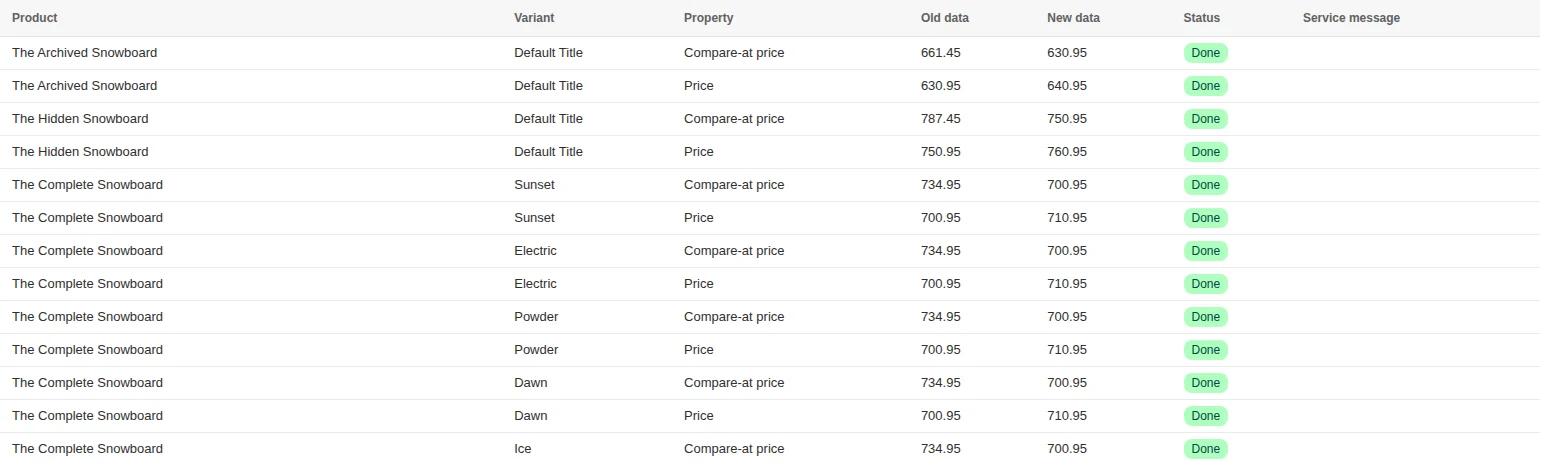
The task log lists each variant with the old and new price, plus anything that was skipped and the reason, so a partial run is never a mystery.
How to bulk edit prices on Shopify, step by step
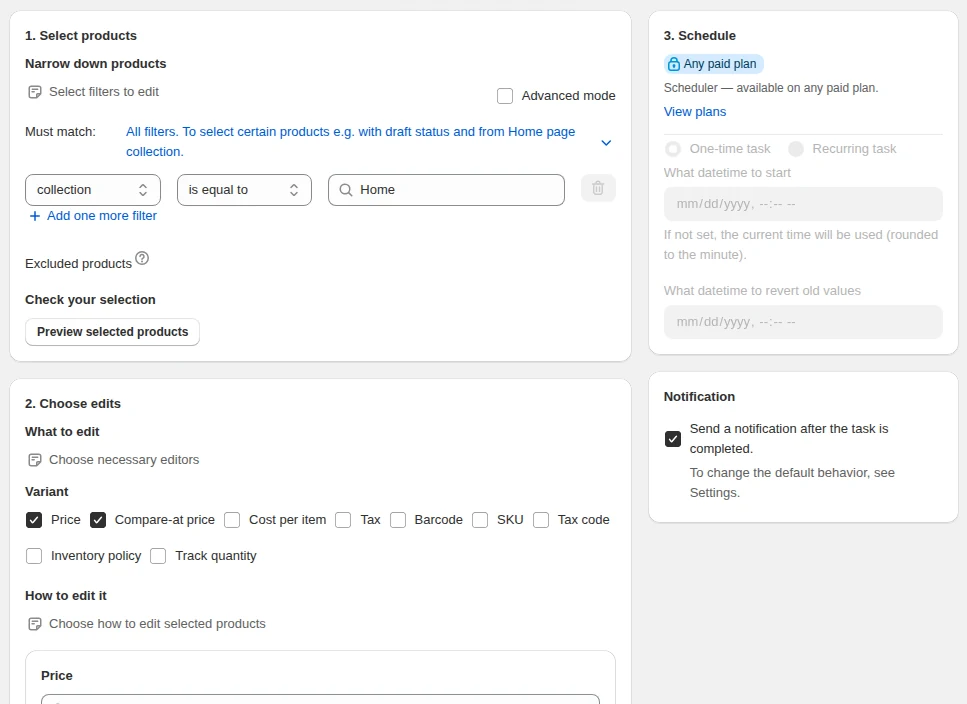
- Open New task. In the Shopify admin go to Apps → Bulk Product Edit → New task.
- Select the products. Add a filter — collection, vendor, product type, tag, price band or inventory — and decide whether all conditions must match or any of them.
- Check the preview. Open the list of selected products, read the count, and exclude anything that should keep its price.
- Pick the editor. Choose Price, then the action: set, increase or decrease by amount or percentage, or adjust based on cost per item or compare-at price.
- Add rounding. Round to .99, .95 or a whole number, up, down or to the nearest value.
- Run or schedule. Run now, or set a start time and an optional revert time.
- Read the log. The task lists every variant with the old and new price.

The log of a finished task: compare-at price set to the price from before the task, then the price raised by 10.00.
Every price action, with an example
| Action | Example | Result on a $40.00 variant |
|---|---|---|
| Set to | Set price to 29.99 | $29.99 |
| Decrease by percentage | −20%, round to .99 | $32.99 |
| Increase by amount | +$2.50 | $42.50 |
| Increase by percentage | +8% supplier increase, round to whole up | $44.00 |
| Adjust based on cost per item | cost $16 + 150% | $40.00 → $40.00 (margin rule kept) |
| Adjust based on compare-at price | compare-at $50 − 30% | $35.00 |
| Set compare-at the same as price | before a markdown | compare-at $40.00, price unchanged |
| Swap price and compare-at | fix a reversed price pair | price $50.00, compare-at $40.00 |
| Price from cost and shipping | cost $16 + shipping $4, then markup | price derived from $20 base |
Every editor shows a calculation example before you run anything: type an old price and see the new one with your percentage and rounding applied.
Bulk price increase without losing margin
Supplier increases are the most common reason to touch every price at once. Filter by vendor, increase by the supplier’s percentage, and round up to your price ending. If you keep cost per item up to date, a safer rule is adjust based on cost per item: the price follows the new cost and your markup stays the same instead of drifting.
Raise compare-at price in the same task if you show it as a reference price — otherwise products that were “on sale” suddenly show a compare-at price below the live price, and Shopify hides the strike-through.
Shopify’s native bulk editor vs a price rule
| Task | Shopify bulk editor | Bulk Product Edit |
|---|---|---|
| −15% on 800 variants | Type 800 new numbers | One rule, one task |
| Round to .99 | Manual | Built into the action |
| Price from cost | Spreadsheet, then CSV | Adjust based on cost per item |
| Undo | Re-type or re-import | Revert the task |
| End a sale on Monday | Someone logs in on Monday | Revert time set up front |
| Products per run | Page by page | Up to 70,000 on Plus |
Mistakes that cost money
- Discounting stock you do not have. Add “inventory quantity more than 0” to sale filters.
- Filtering on an automated collection for a scheduled sale. Smart collections re-evaluate; tag the products first and filter on the tag so the revert touches exactly what the start touched.
- Forgetting compare-at price. A cut price without a reference price does not look like a sale.
- Skipping the preview. The count is the cheapest check there is.
Sale prices that actually show as a sale
Shopify shows the struck-through price only when compare-at price is higher than the price. A markdown is therefore two edits in one task: compare-at keeps the old price, the price goes down.
| Goal | Price editor | Compare-at editor |
|---|---|---|
| Start a 20% sale | adjust by percentage −20%, round to .99 | set the same as the price |
| End the sale | revert the task | restored by the same revert |
| Remove a stale strike-through | no change | set to blank (NULL) |
| Show a reference price on cost-priced goods | no change | adjust based on cost-per-item (by percentage) |
| Cut price to compare-at minus 30% | adjust based on compare-at-price (by percentage) −30% | no change |
Why some variants keep their old price
Every task reports how many items it processed and how many it did not, and the log gives the reason for each skipped item. The usual reason is missing data: a rule based on cost per item cannot change a variant whose cost is blank, and a rule based on compare-at price skips variants without one. The editor lists these cases under the calculation example before you run anything.
- Fill cost per item first with a separate task, then run the margin rule.
- Read the processed / not processed count after every large task — it is the quickest sign that the filter caught products without the data the rule needs.
- Exclude bundles and gift cards in the preview if their price is set by hand.
Cost per item in the same pass
Cost per item has its own editor: change to, adjust by amount or percentage, adjust based on price or compare-at price, or set to blank. After a supplier price list arrives, update cost per item for that vendor first, then reprice with adjust based on cost-per-item — the markup stays the same across the range instead of drifting product by product.
Related guides
Bulk edit compare-at price on Shopify
Set, derive or clear the compare-at price so discounts display — and stop displaying — on time.
Read moreBulk edit cost per item on Shopify
Push supplier increases into cost per item, then reprice from cost to a target margin.
Read moreHow to schedule a sale
Give a price change a start time and a revert time so it ends by itself.
Read more