Pick the fields, pick the products, run it once. The app writes the changes through the Shopify API and keeps the previous values so nothing is a one-way door.
Set a value, raise or cut it by amount or percentage, or derive one field from another — price from cost, compare-at from price — and round the result the way your store prices.
Adjust quantities per location with a reason code, switch tracking on or off, and choose whether a variant keeps selling when it runs out.
Rewrite titles and descriptions in bulk with find and replace, prefixes and suffixes, and clean up vendor, type, handle and status while you are there.
Add or remove several tags at once across a collection, a vendor or any filtered slice of the catalog — the fastest way to fill or empty a tag-based collection.
Fill in missing SEO titles and descriptions, or roll out a new template across a category without touching products one by one.
Keep identifiers and tax settings consistent: SKUs, barcodes, the taxable flag and tax codes all change in the same task as everything else.
The same flow whether you are changing four products or a hundred thousand.
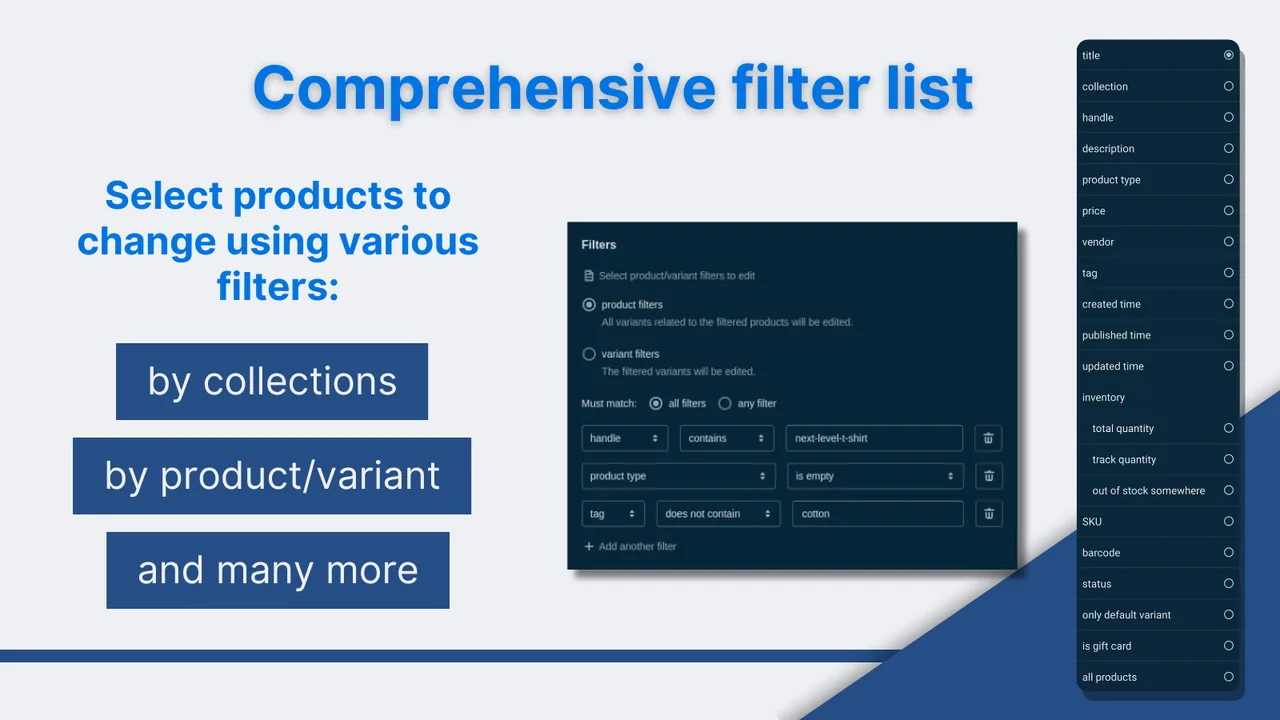
Choose product or variant filters — collection, tag, vendor, type, price, SKU, barcode, status, inventory, option values, dates — combine them with “all” or “any”, then preview exactly what was matched and exclude anything you do not want.
Pick the fields and how they change: set, increase, decrease, base one field on another, find and replace, add or remove text and tags. A calculation example shows the old and the new value before anything is written.
Run it now, or set a start time and a revert time so a sale turns itself on and off. Recurring tasks repeat on the weekdays and time you pick.

Bulk editing goes wrong when you cannot see what happened. Every task keeps its own record.
Revert a finished task with one click, or set the revert time up front so discounted prices return to normal the minute the promotion ends.
Each task lists the product, the variant, the property, the old value and the new one, plus a separate list of items that were skipped and why.
Long tasks run in the background and email you when they are done, so you are not watching a progress bar while a hundred thousand variants update.
4.6 out of 5 from 34 reviews on the Shopify App Store.
“The app’s advanced filtering, scheduling, and rollback features streamline our operations and reduce manual work. Its integration with Shopify Flow allows us to automate recurring edits.”
“Now we can update prices in bulk, run promotions on collections, and even schedule automatic price reverts after the sale. This app really saves us a lot of time.”
“An accurate, cost effective solution for price editing with price rounding options. Compared to our previous CSV edit/import method the time savings are huge.”
Start free. Paid plans raise the records per task, the tasks per month and the recurring tasks you can keep running, and add scheduling, Shopify Flow, full CSV and Excel export and import, Google Sheets, scheduled exports, metaobjects and price history.
All plans include every filter, preview, revert, task logs and Sidekick, which hands a bulk edit from Shopify’s admin assistant to the app. Compare the plans in detail.
Yes. The Free plan runs 5 tasks a month on up to 10 records each, so you can rehearse the whole flow — filters, edits and the result — before paying anything. Scheduling, recurring tasks and Shopify Flow start on Starter.
Yes. Every task stores the old value of every field it touched. You can revert a finished task manually, or set a revert date when you create it so prices roll back on their own after a sale.
With product and variant filters: collection, tag, vendor, product type, title, handle, price, margin, SKU, barcode, status, stock, option values, metafields, images, duplicates and dates. Filters combine with “match all” or “match any”, and you can preview the selection and exclude single products by hand.
Yes. Inventory edits target a specific location and are written with a reason code, so the change shows up correctly in Shopify’s inventory history.
Recurring tasks repeat on the weekdays and time you choose and can revert each run after a set number of hours. From the Starter plan, Shopify Flow actions can also start a bulk edit from your own workflows, and the “Bulk edit finished” trigger starts the next step when a task ends.
| Field | Bulk actions | Guide |
|---|---|---|
| Price | set, raise or cut by % or amount, from compare-at or cost plus markup, round to .99 or to a multiple, swap with compare-at | Bulk edit prices |
| Compare-at price | set, adjust, copy from price, a percent off the price, lowest price of the last N days (Pro), clear | Bulk edit compare-at price |
| Inventory | set or adjust per location, with Shopify reasons; selling policy | Bulk edit inventory |
| Tags | add, remove, rename, replace all, or build tags from product fields | Bulk edit tags |
| SEO title and description | set, prefix, suffix, find and replace, fill from a template, limit the length | Bulk edit SEO fields |
| Title and description | find and replace, add or remove text, HTML | Bulk edit titles |
| Cost per item | set, adjust, clear | Bulk edit cost |
| Status, vendor, type | active, draft, archived; change vendor and product type | Bulk edit status |
| SKU, barcode, weight, tax, handle | set, find and replace, numbered SKUs from a template, convert weight units, charge tax on or off, new handle with a redirect | Bulk edit SKU and barcode |
| Metafields | product and variant metafields by type: set, add text, increase by % | — |
| Images | alt text from a template, add by URL, reorder, variant image | — |
| Options and variants | rename an option or value, add a value (Growth), move, sort values and variants | — |
| Collections and channels | add to or remove from collections, publish on sales channels, category, theme template | — |
| Shipping and customs | requires shipping, country of origin, HS codes, unit price | — |
| Metaobject entries (Growth) | fields, handle, status | — |
| Shopify bulk editor | CSV export/import | Bulk Product Edit | |
|---|---|---|---|
| How you change values | Type each cell | Edit a spreadsheet | Describe a rule once |
| −20% and round to .99 | Manual | Formulas, then import | One action |
| Select by filters | Admin filters, one page at a time | Filter the sheet | All or any of many conditions |
| Start and end a sale on schedule | No | No | Yes, with automatic revert |
| Undo | No | Re-import the old file | Revert any task |
| Repeat weekly | No | No | Recurring tasks |
| Cost | Free | Free | Free plan, paid from $9.99 |
Shopify’s editor is fine for a dozen fixes. CSV is right for migrations. For repeated rule-based changes — sales, supplier increases, tag clean-ups, SEO patterns — a bulk edit app is faster and safer, because every change is logged and reversible. See the full comparisons: vs Shopify’s native bulk editor, vs CSV import and best Shopify bulk edit apps.