Why big catalogs need more than the built-in editor
Shopify’s bulk editor is a spreadsheet of the products you tick by hand: fine for a few hundred rows, slow for a price change across 300 collections. A CSV export and import reaches every product, but you see the result only after the import, and there is no undo if a column shifted. In a large catalog both problems grow with every product. Step by step for all three methods: how to bulk edit products in Shopify.
How a large-catalog task works
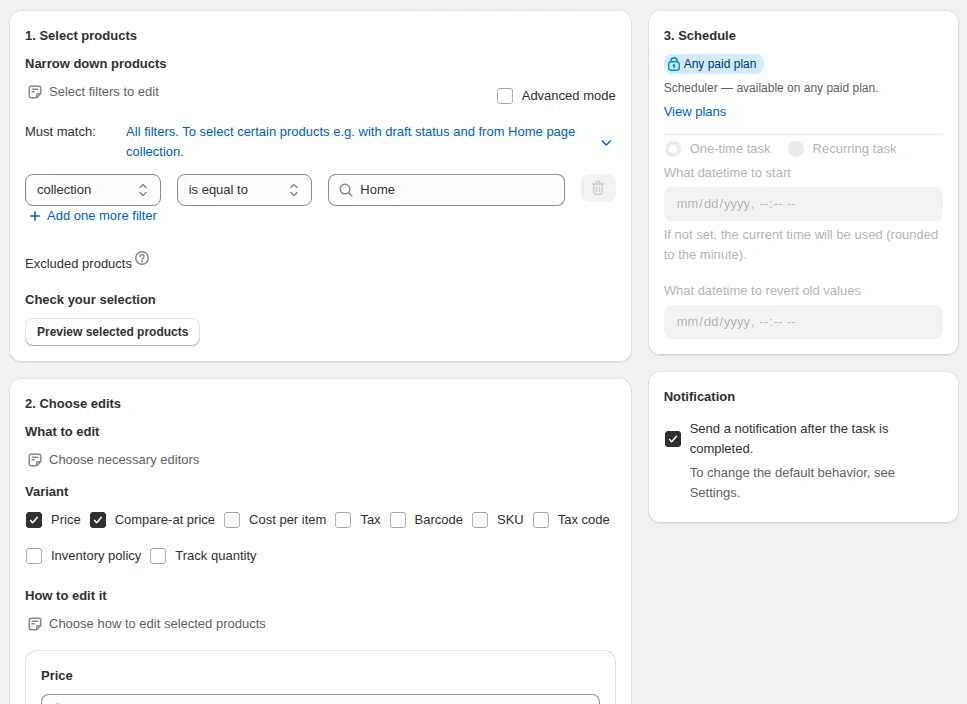
- Filter instead of selecting. Combine collection, vendor, product type, tag, option value, price and stock filters, on products or on variants, matching all of them or any of them.
- Choose the change. Percent or amount from price, compare-at or cost; an exact price; price from cost plus shipping; rounding to .99. Or inventory per location, tags, titles, vendor, type, status, SKU, barcode, weight, tax, handles and SEO fields.
- Preview every row. See every product or variant the filters matched before anything is written, and untick the rows that should stay as they are.
- Run now or on a schedule. Give the task a start time and, for sales, a revert time. Recurring tasks repeat on the weekdays you pick.
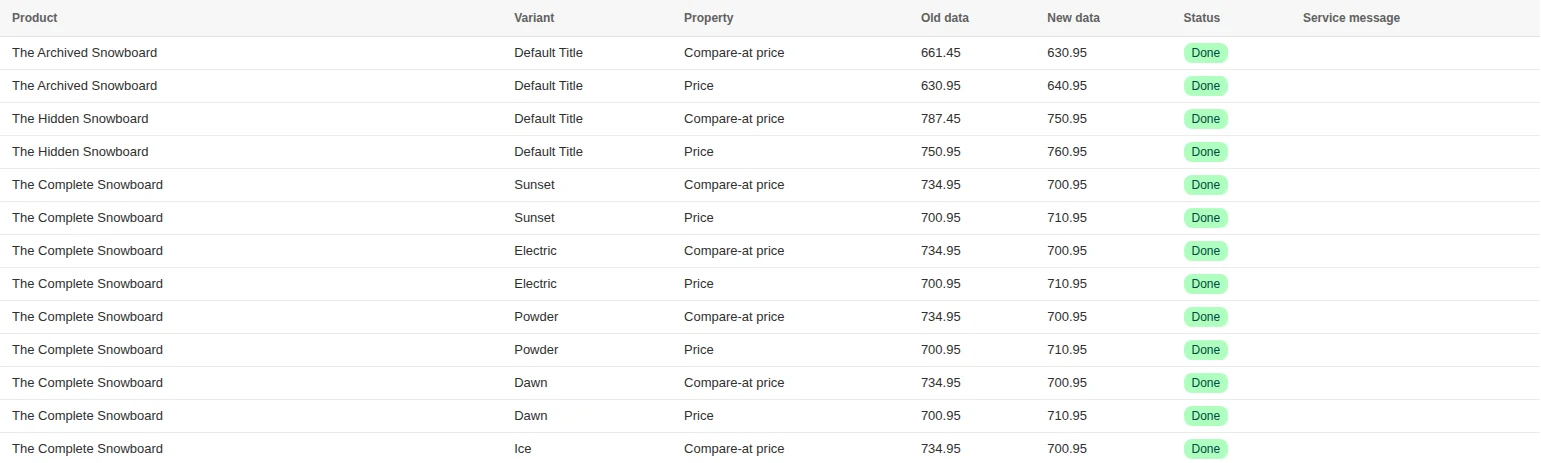
- Check the log, keep the way back. Each row is marked done, skipped or failed with the reason; the finished task stays in the history so you can revert it.
How big a task can be
| Plan | Records per task | Stock rows per task | Recurring tasks | Scheduled exports | History |
|---|---|---|---|---|---|
| Starter, $9.99/mo | 2,000 | 3,000 | 2 | Not included | 30 days |
| Growth, $19.99/mo | 10,000 | 15,000 | 3 | 3 | 90 days |
| Pro, $39.99/mo | 100,000 | 150,000 | 7 | 20 | 180 days |
A task processes about 1,000 variants in 1–2 minutes. The free plan runs the same tasks on 10 records, enough to check a setup before you upgrade.
Setups large catalogs run
Season markdown across hundreds of collections
Tag the season’s products once, filter by the tag, move the price to compare-at, cut 30% and round to .99. Set the revert time to the end of the season.
A supplier’s price list changed
Filter by vendor, raise the price by the supplier’s percent and round to .99, preview, run. One task instead of a CSV round trip per supplier.
Only some sizes or colors
Filter variants, not products — by option value such as size XL or color Black, by price or by stock — and change only those.
Weekly clearance
A recurring task every Friday evening marks down slow movers by tag and reverts each run after the weekend.

Test a large-catalog setup on ten records first — the free plan runs every filter and every edit.
You will be redirected to the Shopify app store.
Related guides
How to bulk edit products in Shopify
The admin bulk editor, CSV import or an app: steps, limits and which one fits your edit.
Read moreHow to filter the products you want to edit
Conditions, match all or any, exclusions and the preview that prevents accidents.
Read moreBulk edit products by collection on Shopify
Use collection membership as the filter, combined with stock, tags and price.
Read moreHow to schedule a sale
Give a price change a start time and a revert time so it ends by itself.
Read moreBulk editing vs CSV import on Shopify
Where spreadsheets beat an app, and where they quietly cost you a day.
Read moreBulk Product Edit vs Matrixify
Spreadsheet pipeline versus rule-based editor — different tools for different jobs.
Read more