Compare-at price is what themes use to draw the struck-through “was” price and the sale badge. Set it without cutting the price and customers see a discount that does not exist; leave it behind after a sale and every product looks permanently reduced.
Because it is a per-variant field, fixing it by hand across a catalogue is exactly the kind of work that should be one task.
What you can do with compare-at price
- Set the same as the price — snapshot today’s price as the reference, then discount the price itself in the same task.
- Adjust by amount or percentage — raise or lower the reference price directly.
- Adjust based on price — derive it from the live price, for example 25% above.
- Set to blank (NULL) — clear it everywhere, which is how you end a sale cleanly.
- Round to — keep reference prices in the same decimals as the rest of the catalog.
Clear stale compare-at prices across the catalog before your next promotion starts.
You will be redirected to the Shopify app store.
Finding the products that need it
- Products where compare-at price is empty — the ones missing their reference price.
- Products where compare-at price is not empty — leftovers from a finished promotion.
- By collection, tag or vendor for a scoped promotion.
- By price band — more than or less than a threshold.
- Variant filters if only some options are on offer.
A worked example: end a sale and clean up after it
- Filter: compare-at price is not empty, tag contains “spring-sale”.
- Editor: price → set the same as the compare-at price, so the original price returns.
- Editor: compare-at price → set to blank (NULL).
- Editor: tags → remove “spring-sale”.
- Run it once and the promotion disappears from the storefront, the prices, and your tags in one pass.
Why the order matters
Within a task the app applies the editors together and records the previous values of both fields, so restoring the price from compare-at and then clearing compare-at is safe — the revert still knows what each field held before the task ran.
If a product changed in between for some other reason, it is reported in the skipped list rather than being overwritten with stale data.
Compare-at price actions
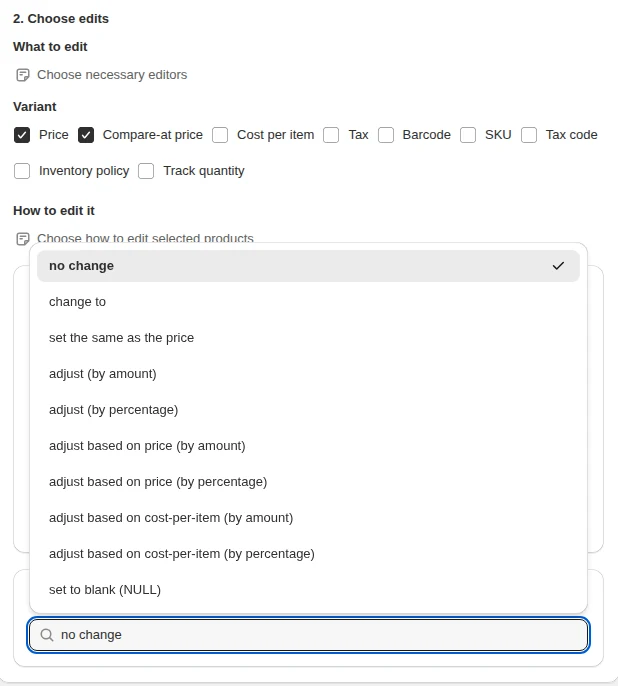
Set the same as the price copies the current price into compare-at — the usual first step before a markdown. Set to blank removes the compare-at price, which ends the strike-through display after a sale.
Related guides
How to bulk edit prices
Set, raise, cut, derive and round Shopify prices across a filtered slice of the catalog.
Read moreBulk discount products on Shopify
Apply a storefront discount across a range and restore prices afterwards.
Read moreHow to schedule a sale
Give a price change a start time and a revert time so it ends by itself.
Read more